If you're a forex trader looking for the best charting software in 2026, this review will save you months of trial and error. TradingView is the best charting platform for forex traders, and I'll explain exactly why — along with where it falls short and how it stacks up against the competition.
Why Charting Software Matters for Forex Traders
Forex moves 24 hours a day, five days a week. You need charts that are fast, reliable, and accessible from anywhere. Unlike equities, where you might check positions once a day, forex traders often need to react to news events in real-time across multiple sessions — London, New York, Tokyo, Sydney.
Your charting platform isn't just a tool. It's your cockpit. The wrong one costs you time, clarity, and eventually money.
TradingView: The Complete Package
Chart Quality and Speed
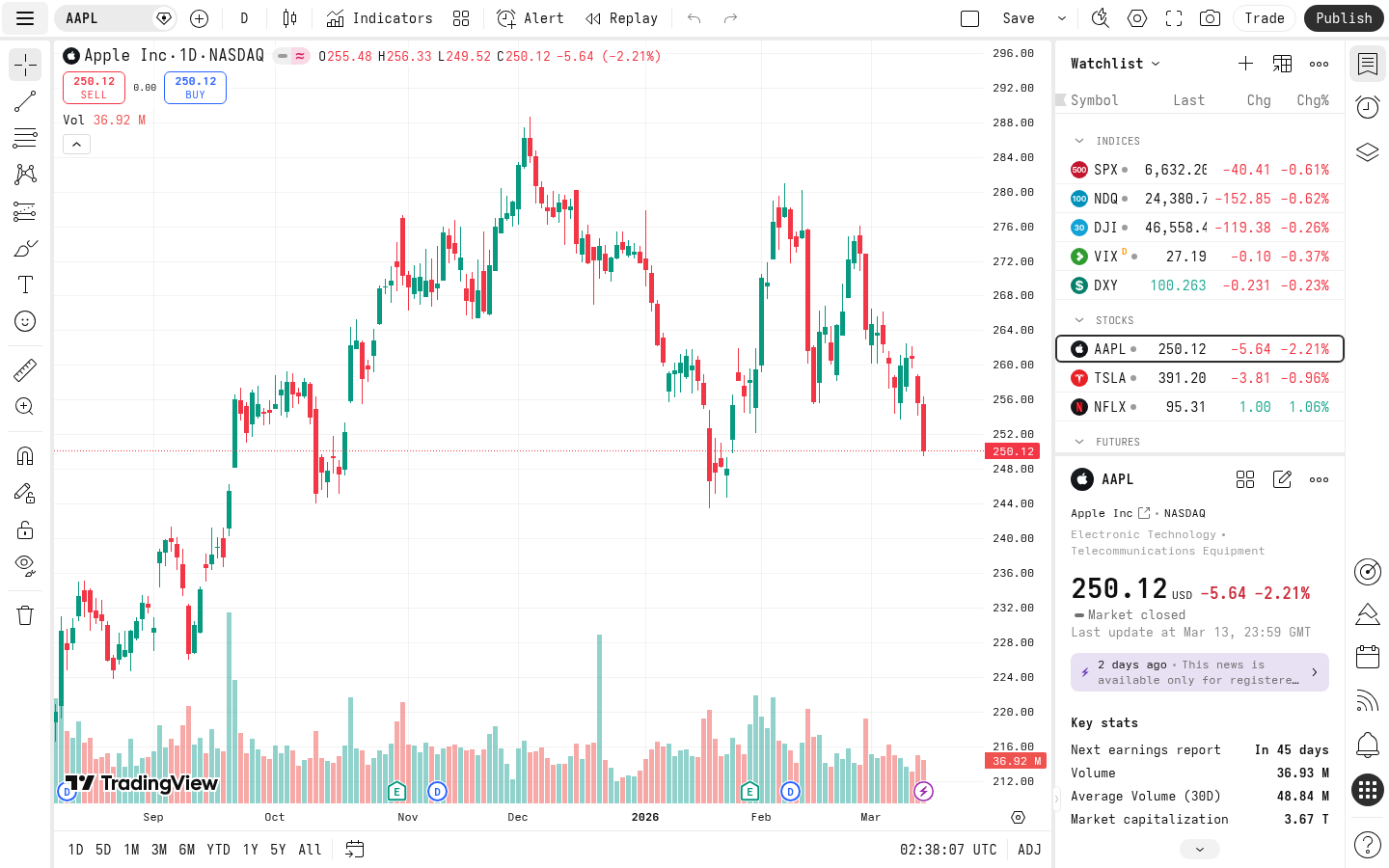
TradingView's charts are simply the best-looking and most responsive in the industry. The HTML5 rendering engine is smooth even on modest hardware. Zooming, scrolling through years of data, switching timeframes — everything feels instant.
For forex specifically, you get clean candlestick charts with pixel-perfect rendering. I run USDJPY on a 4-hour chart with Bollinger Bands, a 200 EMA, and RSI — and there's zero lag. Compare this to MT4's dated interface, and it's night and day.
The platform supports every chart type you'd want: candlesticks, Heikin Ashi, Renko, line break, Kagi, point and figure, and more. Each one renders beautifully.
Forex Coverage and Data
TradingView covers 180+ forex pairs (as of 2026-04) through multiple data providers. Major pairs like EUR/USD, GBP/USD, and USD/JPY have real-time data on the free plan. You also get access to exotic pairs, crypto crosses, and CFD data.
One thing I love: you can overlay related instruments. I keep USDJPY and US 10-year yields on the same chart to watch the correlation. Try doing that seamlessly on MT4.
The economic calendar is built right in. No need for a separate tab open to Forex Factory. Earnings, central bank decisions, NFP — it's all there on your chart timeline.
Pine Script: Your Secret Weapon
Pine Script is TradingView's proprietary scripting language, and it's what separates TradingView from every other charting platform. In 2026, Pine Script v6 is mature, well-documented, and surprisingly powerful.
Here's what I use it for:
- Custom indicators: I wrote a momentum + seasonality indicator for USDJPY that highlights historically strong months (February, June, October) with a green background. It took about 30 lines of code.
- Backtesting strategies: Pine Script strategies let you backtest directly on the chart. No external software needed.
- Alerts: Set alerts based on any Pine Script condition. "Alert me when RSI crosses below 30 on USDJPY 4H" — done in seconds.
Compare this to MT4's MQL4 — a C-like language that's significantly harder to learn and debug. Pine Script feels modern, almost like Python. You can go from idea to working indicator in 20 minutes.
Multi-Device Experience
This is where TradingView truly shines for forex traders. Because forex is a 24-hour market, you need access everywhere:
- Desktop browser: Full-featured, no download required. Works on any OS.
- Desktop app: Available for Windows, Mac, and Linux. Same features, slightly better performance.
- Mobile app (iOS/Android): Genuinely usable for analysis, not just a stripped-down afterthought. I've placed alert-driven trades from my phone during the Asian session more times than I can count.
- Tablet: The iPad experience is excellent for chart analysis.
MT4/MT5's mobile apps feel like they're from 2015. TrendSpider doesn't even have a proper mobile app.
Like what you're reading? Try it yourself — this link supports ChartedTrader at no cost to you.
Try TradingView Free →Social and Community Features
TradingView has the largest trading community online. The ideas stream shows you what other traders are thinking about any instrument. For forex, this means:
- Published trade ideas with charts and annotations
- Community-built indicators and strategies
- Comments and discussions on any chart
- Following traders whose analysis you respect
Alerts System
TradingView's alert system is best-in-class. You can set alerts on:
- Price levels
- Indicator values
- Drawing tool interactions (price touches a trendline)
- Custom Pine Script conditions
As of 2026-04, free accounts get 5 active alerts. For serious forex trading, you'll want at least the Plus plan for 20 alerts.
Free Plan vs. Paid Plans
As of 2026-04, TradingView's free plan is genuinely useful — it's not a crippled demo:
| Feature | Free | Plus ($14.95/mo) | Premium ($29.95/mo) | Ultimate ($59.95/mo) |
|---|---|---|---|---|
| Charts per tab | 1 | 2 | 4 | 8 |
| Indicators per chart | 2 | 5 | 10 | 25 |
| Alerts | 5 | 20 | 100 | 400 |
| Saved chart layouts | 1 | 10 | Unlimited | Unlimited |
| No ads | ❌ | ✅ | ✅ | ✅ |
| Custom timeframes | ❌ | ✅ | ✅ | ✅ |
| Volume profile | ❌ | ❌ | ✅ | ✅ |
- Casual/learning: Free plan is fine. You get real-time forex data and basic charting.
- Active trader: Plus plan. The extra indicators and alerts are worth it.
- Professional: Premium. Volume profile and 100 alerts make a real difference.
TradingView vs. The Competition
vs. MetaTrader 4/MT5
MT4 is still the most widely used forex platform, but that's momentum, not merit.
| Aspect | TradingView | MT4/MT5 |
|---|---|---|
| Chart quality | ★★★★★ | ★★★ |
| Indicator library | 100,000+ community (as of 2026-04) | Limited built-in + MQL market |
| Scripting | Pine Script (easy) | MQL4/MQL5 (complex) |
| Multi-device sync | Seamless | Poor |
| Broker integration | 50+ brokers (as of 2026-04) | Tied to one broker |
| Execution | Via connected broker | Direct |
| Cost | Free tier available | Free (via broker) |
vs. TrendSpider
TrendSpider is a solid alternative with some unique features:
- Automated trendline detection: TrendSpider automatically draws trendlines and support/resistance levels. It's genuinely useful.
- Multi-timeframe analysis: Overlay multiple timeframes on one chart — a feature TradingView doesn't match.
- Raindrop charts: A proprietary chart type that combines price and volume.
- No free plan (starts at $22/month, as of 2026-04)
- No mobile app worth using
- Much smaller community
- Forex data coverage isn't as comprehensive
- No Pine Script equivalent for custom indicators
vs. TC2000
TC2000 is popular among US stock traders but isn't a great fit for forex:
- Limited forex pair coverage
- US-market focused data
- No community indicator library comparable to Pine Script
- Desktop-only (Windows/Mac), no web version
- No free tier
What TradingView Could Do Better
No platform is perfect. Here's where TradingView has room to improve:
- Direct broker execution: While TradingView connects to 50+ brokers (as of 2026-04), the execution experience isn't as smooth as trading directly through MT4. There's an extra step, and slippage can be slightly higher.
- Backtesting depth: Pine Script backtesting is convenient but limited compared to dedicated backtesting platforms. You can't test portfolio-level strategies or run Monte Carlo simulations.
- Tick data: TradingView doesn't offer tick-level data. For scalpers who need sub-minute granularity, this is a limitation.
- Price: The free plan is great, but serious traders will spend $15-60/month (as of 2026-04). MT4 is free through most brokers.
- Data delays on some instruments: While major forex pairs are real-time, some exotic pairs and certain data feeds have delays on lower-tier plans.
My Daily TradingView Workflow
Here's how I actually use TradingView for USDJPY trading:
- Morning scan (5 min): Open my USDJPY layout. Check daily, 4H, and 1H charts. My Pine Script momentum indicator tells me the current regime.
- Level marking (2 min): Update key support/resistance levels. TradingView's drawing tools make this fast.
- Alert setting (1 min): Set alerts at key levels. If USDJPY hits 148.50, I want to know.
- Economic calendar check (1 min): Any BOJ or Fed events today? The built-in calendar shows me.
- Community scan (2 min): Quick look at top USDJPY ideas. Any consensus forming?
The Verdict
For forex traders in 2026, TradingView is the best charting software available. It combines the best charts in the industry with a powerful scripting language, seamless multi-device experience, and the largest trading community online.
The free plan lets you start without risk. If you're still using MT4 for analysis, you owe it to yourself to try TradingView for a week. You won't go back.
Is it perfect? No. Direct execution could be better, and power users might outgrow Pine Script's backtesting capabilities. But for 95% of forex traders, TradingView is the right choice. Try TradingView Free →---
*I use TradingView daily for my own forex analysis. The link above is an affiliate link — if you sign up through it, I earn a small commission at no extra cost to you. I only recommend tools I genuinely use.*