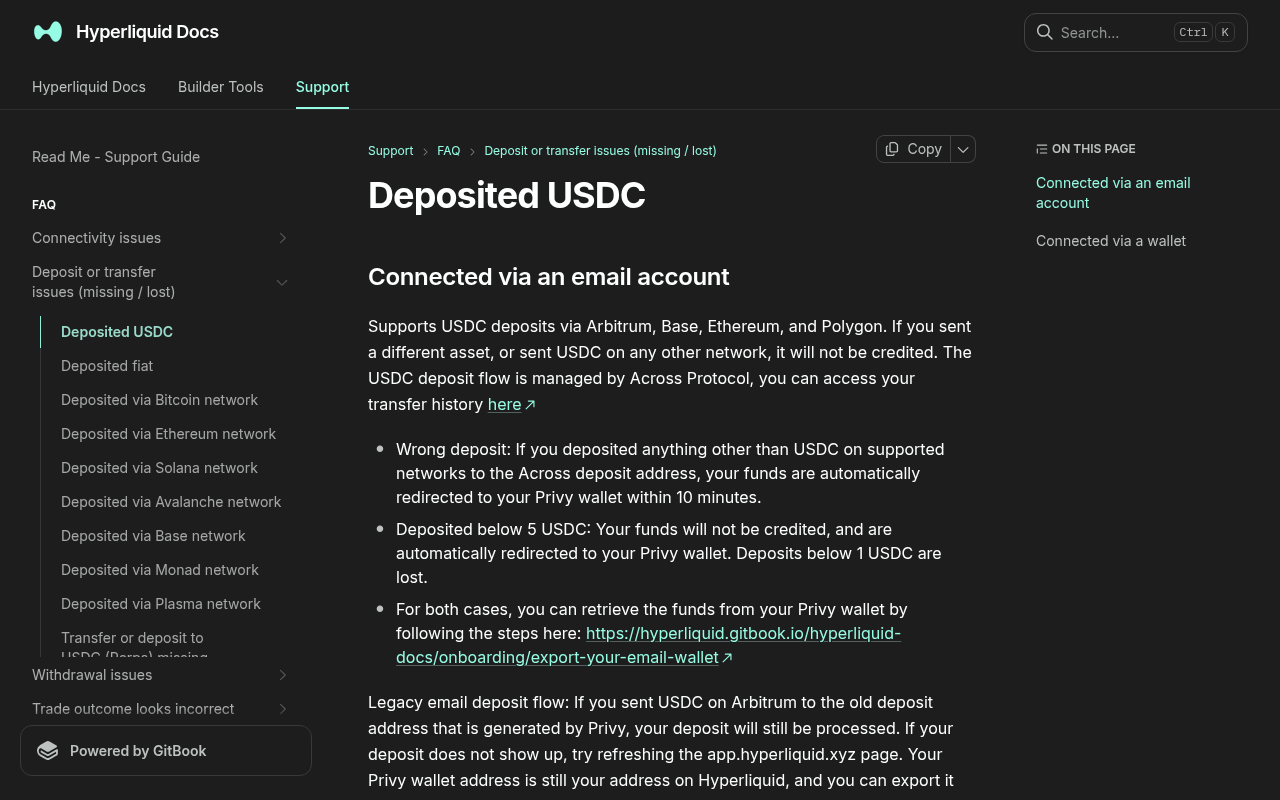
*Evidence: Official documentation, captured and refreshed automatically each week. Official source.*
Hyperliquid's current support page says the Arbitrum route supports USDC only and documents a 5 USDC minimum. USDT, ETH, ARB, other tokens, another network, or a sub-minimum deposit will not behave like a normal supported deposit.
Preserve evidence first
Record these details before reconnecting wallets or retrying:
- transaction hash;
- timestamp and amount;
- source network;
- token contract, not only its symbol;
- sender and destination public addresses;
- Hyperliquid login method and displayed account address;
- screenshot of the live deposit status with private information hidden.
Decision tree
Branch 1: There is no transaction hash
The wallet may never have submitted the transaction. Reopen the wallet activity and check whether the request was rejected or abandoned. Confirm the network and gas balance before trying again. Do not infer success from a closed browser modal.
Branch 2: The Arbitrum transaction is pending
Wait for the transaction to reach a final state. A pending network transaction cannot yet be credited reliably. Avoid creating another transfer with the same intent. Use a wallet's documented speed-up or cancellation controls only when you understand how its nonce handling works.
Branch 3: The transaction failed
A failed transaction did not complete the intended deposit. Read the explorer's failure status, confirm that ETH gas remains available, reload the official interface, and rebuild the transaction from the beginning. Verify the amount and token approval instead of blindly repeating the same request.
Branch 4: The transaction succeeded, but the connected account is different
Compare the receiving address on the explorer with the public address shown in Hyperliquid. Email login and DeFi-wallet login can correspond to different addresses. Reconnect the address that actually received the funds. Do not send more money to “activate” either account.
Branch 5: Wrong network or wrong token
Hyperliquid support states that the Arbitrum route supports USDC, not USDT, ETH, ARB, or another token. Recovery depends on the destination and login method. The official page documents a recovery path for some wrong deposits to an email account by exporting that email wallet; exporting a private key is sensitive and should only be done from verified official instructions. Do not assume the same path works for an external wallet or other network.
Branch 6: Amount below the minimum
The support page currently states that deposits below 5 USDC are not credited. It says an email-login user can send more supported USDC so the whole amount is credited, while a non-email-wallet deposit below the minimum may be lost. Confirm that current rule on the official page before acting.
Branch 7: Correct USDC, Arbitrum, amount, and account; transaction succeeded
Wait through the normal processing window shown by the current interface. Then use only official support links reached from Hyperliquid's domain. Provide the transaction hash and the minimum public evidence required. Do not post the case publicly with your complete address history.
Success check
Resolution means one of two things is proven:
- the supported deposit is credited to the intended Hyperliquid account; or
- the exact unsupported/wrong-account cause is identified and an official recovery path or loss outcome is documented.
After recovery
When the balance appears, do not rush into a large order. Continue with Place Your First Hyperliquid Perp Trade Safely. For a clean future deposit, use Deposit USDC via Arbitrum.
Official sources and review date
Facts verified July 16, 2026. Scheduled for factual review August 16, 2026.Risk warning: Never send another transfer until the first transaction's network, token, destination, amount, and final status are known.