About this guide: I'm the writer behind supa.is. Between February and May 2026 I've published 150+ articles on supa.is across crypto and brokerage tooling — including 30+ Hyperliquid-specific guides (recent examples: Hyperliquid Getting Started: Wallet to First Perp 2026, Hyperliquid Missing Fills: Reconciliation Guide (2026), Hyperliquid Setup: Wallet to First Perps Trade (2026)). The most-repeated reader question across that Hyperliquid archive is exactly *why their first trade gets stuck in pending or rejected*, which is why I'm publishing this standardized guide instead of answering one-off.
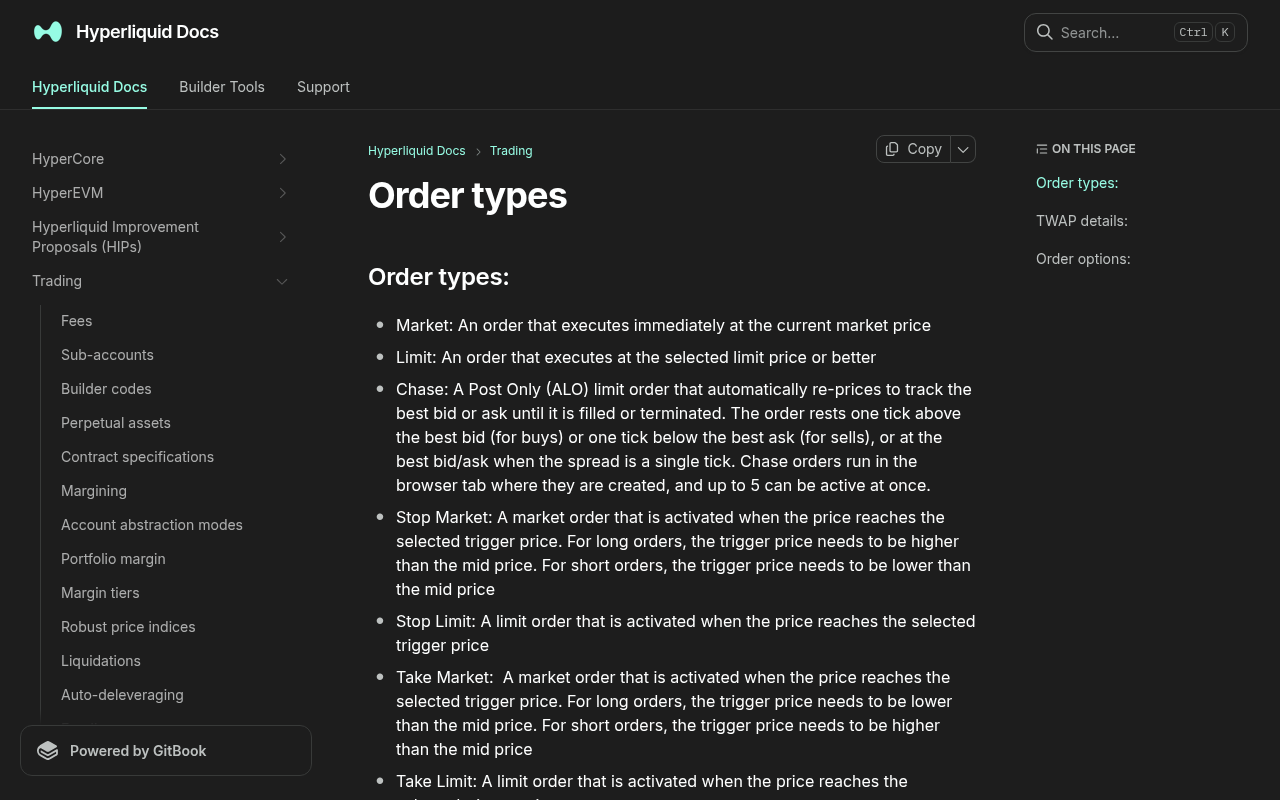
*Evidence: Official documentation, captured and refreshed automatically each week. Official source.*
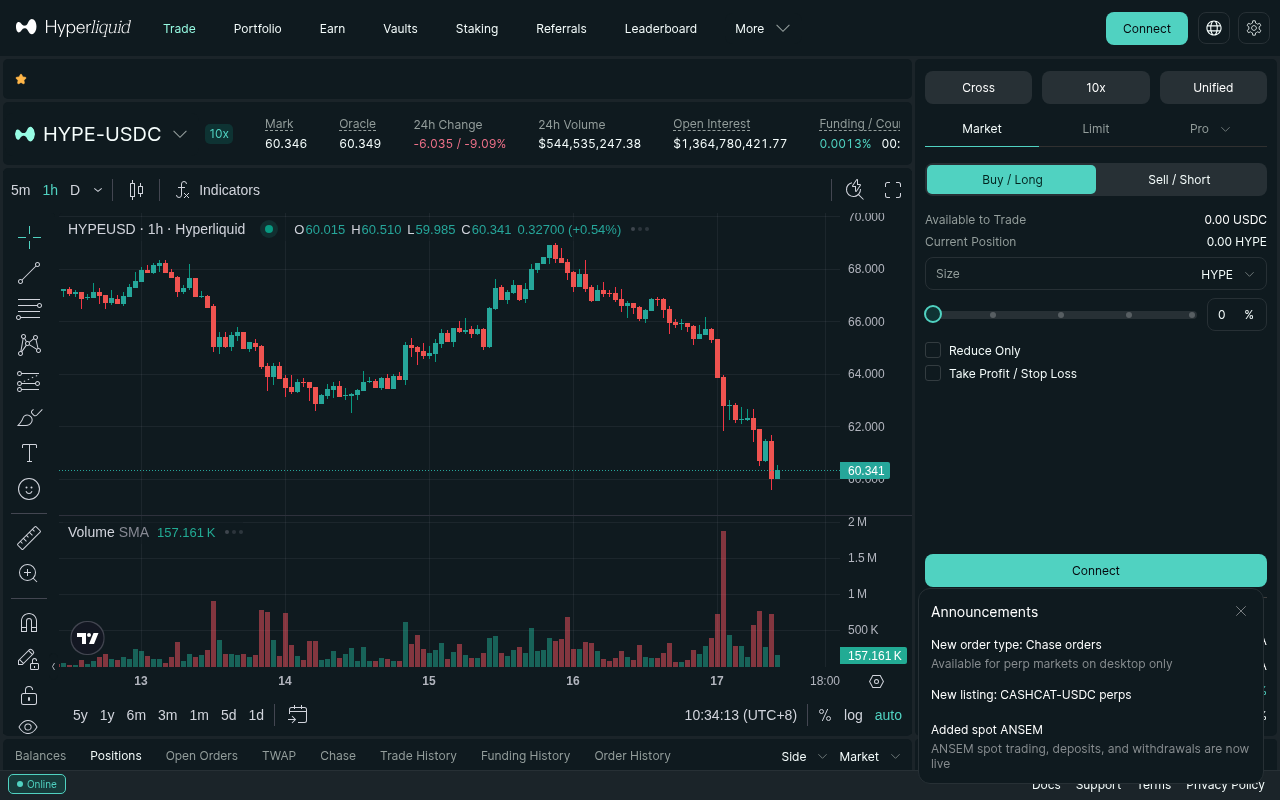
*Evidence: Logged-out mainnet public UI, captured and refreshed automatically each week. Official source.*
You've connected your wallet, bridged USDC, and finally hit the "Buy" button on Hyperliquid. But instead of seeing your position open, the order sits there in "pending" status, or worse, gets rejected outright.
For new traders, this is the most frustrating part of onboarding. You've done the homework, but the platform won't cooperate. The good news is that this rarely means your account is broken. It almost always means you've hit one of three common friction points: insufficient margin for the leverage you selected, a limit order placed at a price the market has already passed, or a bridge/fee deduction issue.
In this guide, we'll walk through exactly why your first trade isn't showing up as filled, and how to fix it in under five minutes.
Why Your First Hyperliquid Trade Is Stuck Pending
When you place an order on Hyperliquid, the system evaluates it against your account balance, the current order book, and the margin requirements of the specific perpetual contract. If any of these checks fail, the order won't fill.
Here are the four most common reasons your first trade is stuck, ranked by how frequently new users encounter them.
1. You Don't Have Enough Margin for the Selected Leverage
This is the number one culprit. Hyperliquid lets you select leverage up to 50x (as of July 2026, per Hyperliquid docs). If you have $100 in your account and select 50x leverage, the system will try to open a $5,000 position.
However, Hyperliquid requires a minimum margin to open *any* position. If your balance is too low to cover the initial margin requirement plus the trading fees, the order will be rejected or sit pending as the system calculates whether it can execute.
The Fix: Lower your leverage. If you are trying to open a $100 position, drop the leverage to 1x or 2x. You don't need high leverage to make your first trade. Once the order fills, you can adjust your position size later.2. You Placed a Limit Order at an Outdated Price
If you are using a "Limit" order type, you are telling Hyperliquid to only fill your trade at a specific price or better. If you looked at the chart, decided on a price, and then took 30 seconds to type it in, the market might have already moved past your price.
For example, if you set a limit buy at $100, but the price is now $101, your order will sit in "pending" forever until the price drops back to $100.
The Fix: Switch your order type to "Market." A market order tells Hyperliquid to fill your trade immediately at the current best available price. It's slightly more expensive due to taker fees, but it guarantees your first trade will actually execute.3. Your USDC Bridge Is Still Processing
Hyperliquid runs on its own L1, meaning you have to bridge USDC from Arbitrum or another chain. Sometimes, users think their funds have arrived because they see the transaction on the bridge interface, but the funds haven't actually hit their Hyperliquid balance yet.
If you try to trade before the USDC is fully credited to your Hyperliquid account, the system will reject the order because your available balance is zero.
The Fix: Check your actual balance on Hyperliquid. If it shows $0, wait for the bridge to complete. You can view your bridge status on the Hyperliquid dashboard.4. Your Wallet Is Connected to the Wrong Network
Hyperliquid requires your wallet to be connected to the Hyperliquid chain. If your wallet is still on Ethereum Mainnet, Arbitrum, or Optimism, the transaction will fail or hang indefinitely.
Like what you're reading? Try it yourself — this link supports ChartedTrader at no cost to you.
Sign up on Hyperliquid →How to Fix a Pending Order on Hyperliquid
If your order is already stuck in "pending" status, you can't just wait for it to magically fill. You need to cancel it and re-place it correctly.
Here is the step-by-step process to clear a stuck order:
- Open the Order Book Panel: On the Hyperliquid trading interface, look at the right-hand side of the screen where your active orders are listed.
- Find Your Pending Order: It will be listed under "Open Orders" or "Active Orders."
- Click Cancel: Hit the cancel button next to the pending order. This frees up your margin and removes the order from the book.
- Adjust Your Settings: Before re-placing the order, review your leverage and order type.
- Re-place the Order: Use a Market order or a Limit order at the current market price.
Understanding Hyperliquid Order Types
To prevent your first trade from failing in the future, it helps to understand the difference between the two main order types on Hyperliquid.
Market vs. Limit Orders
A market order executes immediately at the best available price. When you click "Buy" with the Market toggle on, Hyperliquid takes whatever price is currently available from the sellers. It guarantees your trade will fill instantly, but you pay a slightly higher taker fee and might experience slippage if the market is moving fast.
A limit order only executes if the price reaches your specified level. If you want to buy Bitcoin at exactly $60,000, you set a limit order at $60,000. You pay a lower maker fee and control the exact entry price, but if the price never reaches $60,000, your order will sit pending forever.
For your first trade, Market orders are highly recommended. The goal is to get in the market, see how the interface works, and understand how your PnL moves. You can switch to limit orders once you are comfortable with the platform.
Margin Requirements and Why Small Balances Get Rejected
Hyperliquid uses a cross-margin system by default, which means your entire account balance is used as collateral for your positions. However, every position has a minimum margin requirement.
If you have $10 in your account, you might find that you can't open a position at all, even at 1x leverage. This is because the minimum margin requirement for certain pairs is higher than $10.
When you see a "rejected" order, it almost always means your available balance is below the minimum margin threshold for that specific perpetual contract.
The Fix: Deposit more USDC via the bridge, or choose a different trading pair that has a lower minimum margin requirement.How to Verify Your Trade Actually Filled
Sometimes, your order *did* fill, but you didn't realize it because you were looking at the wrong part of the screen.
To verify your trade:
- Check the Positions Tab: Look at the bottom of the Hyperliquid interface. If you have an open position, it will be listed there with your current PnL.
- Check the Order History: If the order was filled and then immediately closed (due to a stop loss or manual close), it won't show in your open positions. Instead, check your "Order History" or "Trade History" to see the fill details.
- Check Your Account Value: If your account value has changed from your initial deposit, you likely have an open position or a realized PnL.
Common Mistakes New Traders Make on Their First Trade
Beyond technical glitches, new traders often make strategic mistakes on their very first trade that result in immediate losses or confusion.
1. Using Maximum Leverage
It's tempting to use 50x leverage on your first trade to maximize returns. But high leverage means high liquidation risk. If the market moves just 2% against you, you could lose your entire account. Start with 1x to 5x leverage. Treat your first trade as a learning experience, not a get-rich-quick scheme.
2. Not Setting a Stop Loss
A stop loss automatically closes your position if the price moves against you by a certain amount. Without a stop loss, a sudden market dip can wipe out your account. Always set a stop loss below your entry price (for long positions) or above your entry price (for short positions).
3. Ignoring Funding Rates
Perpetual futures on Hyperliquid have funding rates that are paid or received every 8 hours. If you are holding a position, you might be paying or receiving funding. If you are new, this can look like a mysterious fee or bonus.
For a detailed breakdown of how funding rates work and how they affect your costs, read our Hyperliquid Funding Rate History & Cost Calculator (2026).
FAQ
Why is my Hyperliquid order stuck in pending?
Your order is likely stuck because you placed a limit order at a price the market has already passed, or you don't have enough margin to cover the leverage you selected. Cancel the order, lower your leverage, and switch to a Market order to guarantee a fill.How do I cancel a pending order on Hyperliquid?
Go to the "Open Orders" panel on the right side of the trading interface, find your pending order, and click the "Cancel" button. This will free up your margin immediately.Why did my first trade get rejected on Hyperliquid?
Trade rejections usually happen because your account balance is below the minimum margin requirement for that specific trading pair, or because your USDC bridge is still processing and your balance hasn't updated yet.Should I use a Market or Limit order for my first trade?
Use a Market order. Market orders execute instantly at the current price, guaranteeing your trade will fill. Limit orders require the market to reach your specific price, which can leave your order stuck in pending forever.How much USDC do I need to make my first trade on Hyperliquid?
You need enough USDC to cover the minimum margin requirement of the pair you are trading, plus the trading fees. A small balance is typically sufficient to open a position at low leverage.Risk Warning
Risk Warning: Crypto trading involves substantial risk of loss. Never invest more than you can afford to lose. This is not financial advice.
If you're ready to make your first trade on Hyperliquid without these frustrating hiccups, make sure you're using a referral link that gives you a 4% fee discount on your first $25M in volume (as of July 2026, per Hyperliquid docs).
Sign up on Hyperliquid and start trading with lower fees today.