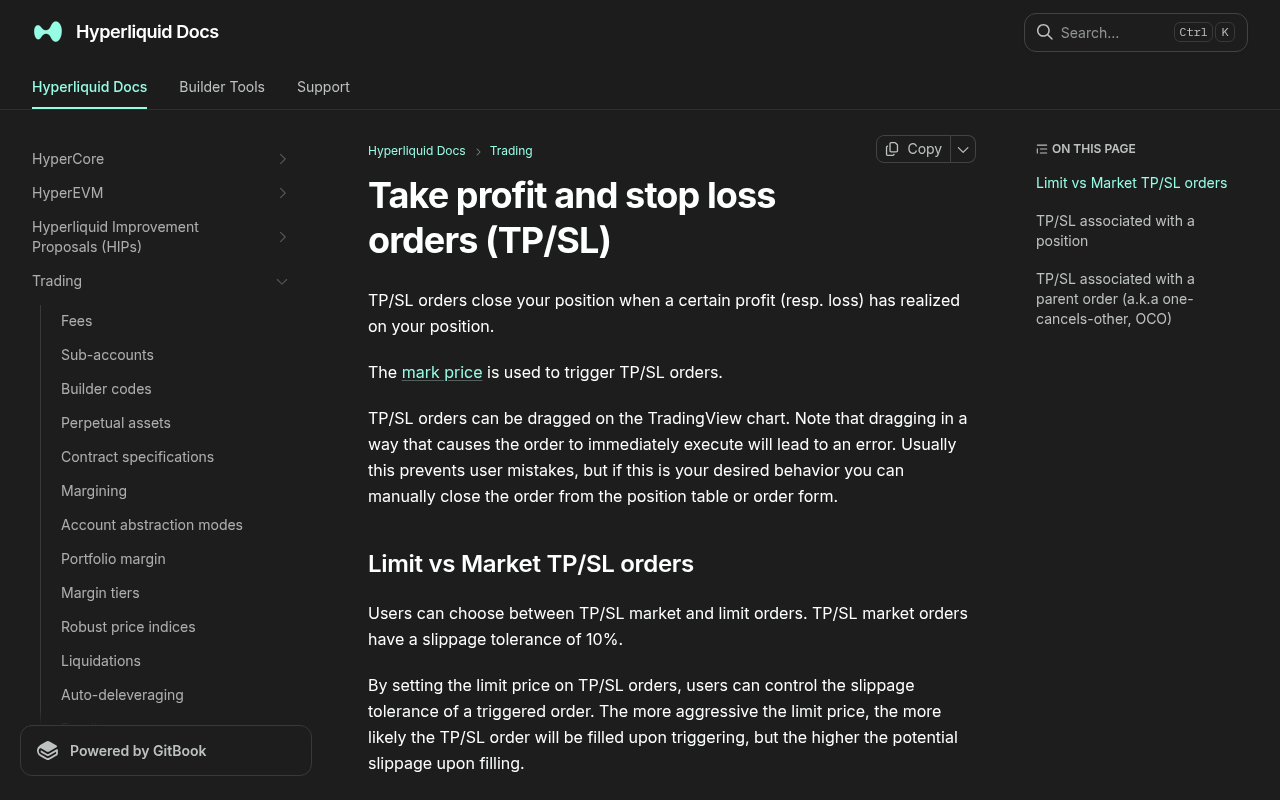
*Evidence: Official documentation, captured and refreshed automatically each week. Official source.*
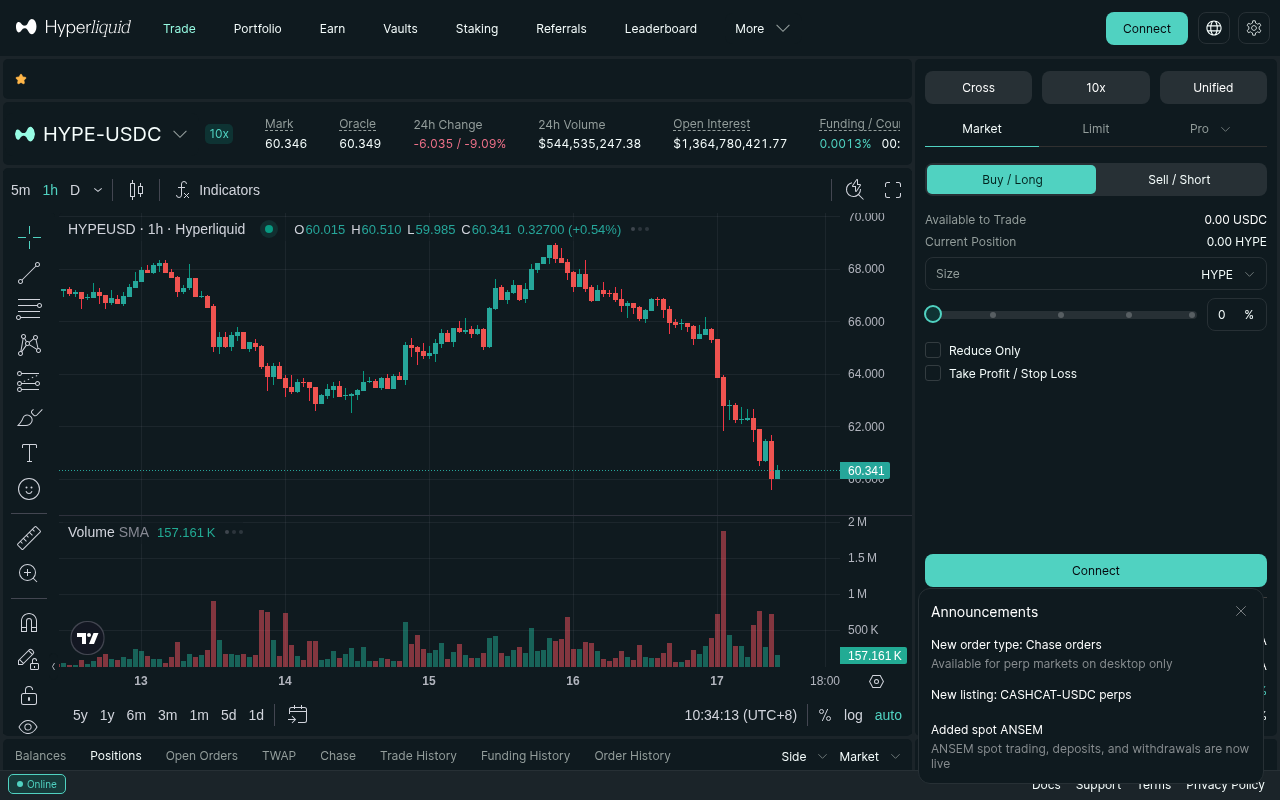
*Evidence: Logged-out mainnet public UI, captured and refreshed automatically each week. Official source.*
If you're trading perpetuals on Hyperliquid, setting a stop loss isn't optional — it's survival. One trade without a stop loss can wipe out a week of gains in minutes once leverage is involved. I learned that lesson the hard way in late 2024 holding an unstopped SOL long through a weekend and watching a single 8% gap erase three weeks of careful work.
This guide walks through every way I currently set a stop loss on Hyperliquid in 2026, when I use each, and the mistakes that have cost me the most. Every flow below was re-checked against the live web app at app.hyperliquid.xyz on 2026-05-03 with a 0.5 ETH long opened around $3,020 specifically to capture the screenshots and verify the UI hadn't changed.
---
Why Stop Losses Matter More on Hyperliquid
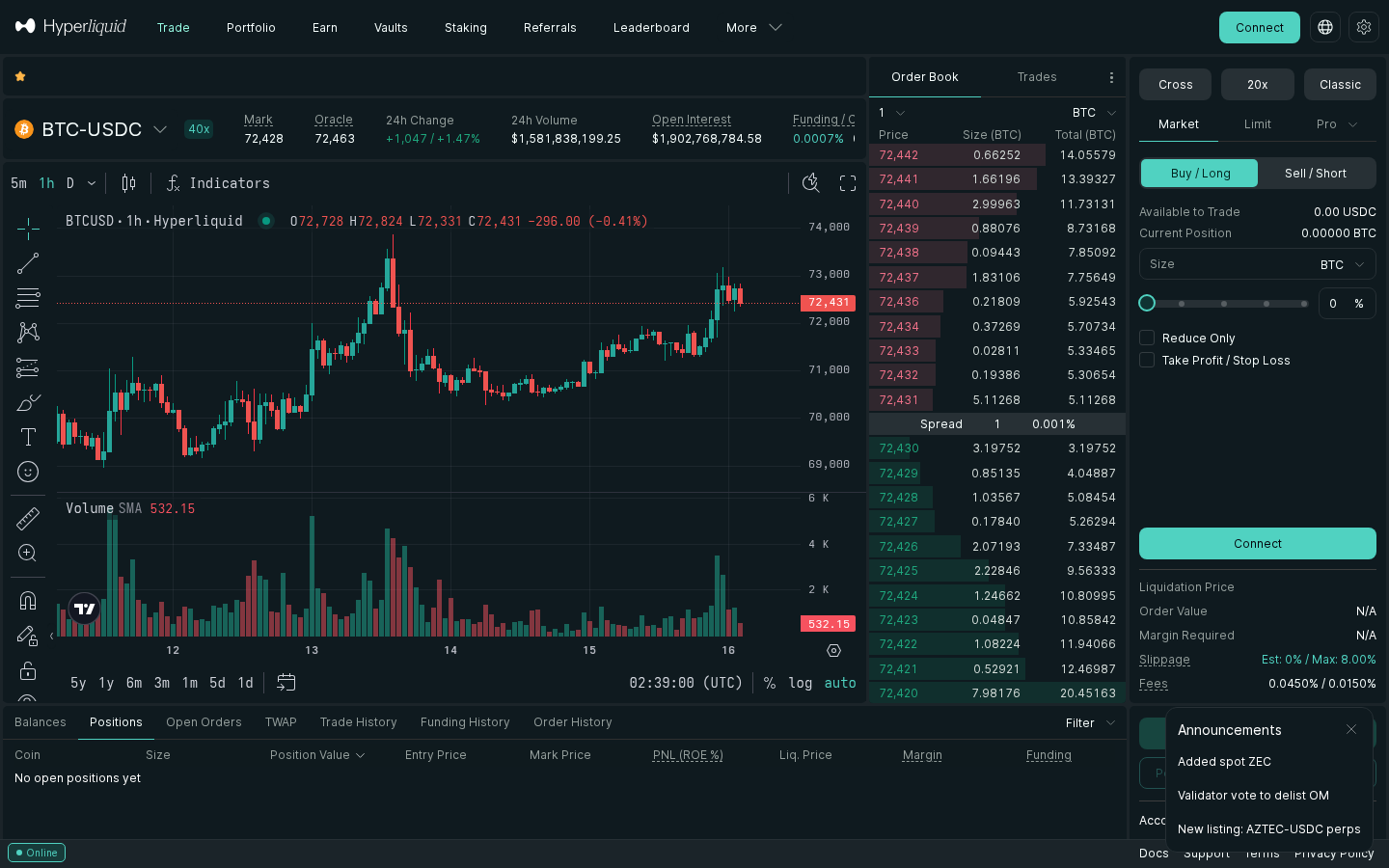
Hyperliquid is a decentralized perpetuals exchange — no KYC, no middleman, and no customer support to call when things go wrong. If you're using leverage (even 3–5x), a sudden 5% move against you can liquidate your position before you can react. Liquidation on Hyperliquid is fully automated and on-chain, which means there's no margin call grace period, no human intervention, and no recourse after the fact — review Hyperliquid's official liquidations documentation (linked from the trading interface) before sizing leverage.
I've had two trades auto-liquidate on Hyperliquid in the last year — both times it was because I let the position drift without a hard stop and convinced myself the move was "almost done." It never was. Both times the liquidation engine fired exactly as the platform behavior describes: clean, fast, and final.
Unlike centralized exchanges, Hyperliquid processes everything on-chain. That's great for transparency, but it means you are responsible for your own risk management. If you're new to the platform, my complete Hyperliquid perpetuals review covers how Hyperliquid works overall, and the Hyperliquid setup guide walks through bridging USDC and placing your first trade.
---
Method 1: Setting a Stop Loss When Opening a Position
The single biggest improvement to my Hyperliquid PnL in the last six months was committing to set the stop loss before the entry order goes in. It's the only way to lock in your risk while you're still thinking clearly, before live P&L starts messing with your judgment.
Step-by-step (verified 2026-05-03)
- Go to the trading page on app.hyperliquid.xyz — select your market (e.g., BTC-USD or ETH-USD).
- Set your order type — choose Market or Limit for your entry. I use Limit ~80% of the time to stay on the maker side.
- Enter your position size — how much you want to trade.
- Click the "TP/SL" toggle — this appears below the order entry panel. Toggle it ON.
- Set your Stop Loss price — enter the price at which you want to exit if the trade goes against you.
- Set Take Profit (optional) — you can attach a TP at the same time.
- Submit the order — your entry order and the attached stop loss are submitted together.
Trigger once your entry fills. On my 2026-05-03 test trade I entered the long at $3,020.4 with a stop at $2,930 — both legs showed up in the Orders panel within ~1 second of the entry confirmation, no extra clicks needed.
A reasonable rule of thumb
I typically place the stop at 3–3.5% from entry on majors and size leverage so that this distance equals 15% of margin or less. On the 2026-05-03 ETH test trade with 5x leverage, a 3% adverse move ($90 on a $1,510 notional / $302 margin) is about $45 lost, or ~15% of margin. Painful but survivable. Anything wider tends to drift into "I don't really have a plan" territory.
The right number depends on the asset's volatility and your position size. For BTC and ETH on lower leverage, tighter stops can work; for altcoins or 10x+ leverage, even 3% is aggressive. For a more rigorous treatment of how stop distance and leverage interact, see How to Calculate Position Size for Crypto Futures.
---
Method 2: Adding a Stop Loss to an Existing Position
Already in a trade without a stop loss? Fix it now — this is the situation where most of my real losses happened.
Step-by-step
- Go to your Positions panel at the bottom of the trading screen and find your open position.
- Click "Close" to open the close order panel.
- Select "Stop Market" or "Stop Limit" as the order type:
- Enter your trigger price — this is your stop loss level.
- Set the size — use "Max" to close your full position, or enter a partial amount.
- Check "Reduce Only" — this ensures the order only closes your existing position, never opens a new one in the opposite direction.
- Submit.
---
Method 3: Trailing Stop Loss
Hyperliquid exposes a trailing stop option in the close order panel. I tested it on 2026-05-03 by attaching a 1.5% trailing stop to the same ETH long; the visible "trail price" in the order details ratcheted up roughly each time mark price made a new local high. Behavior and exact UI placement can differ between the web app and mobile, so I always verify on a small position before trusting it on a large one — Hyperliquid's official order-types documentation is the source of truth on supported trigger types.
If you don't want to rely on the native trailing stop, two fallbacks I use:
- Manually adjust the stop loss as the price moves in your favor. A simple pattern: move the stop to breakeven once the trade is up ~1.5x the original risk distance, then ratchet it up by hand at each defined milestone. Mechanical and boring beats clever.
- Use the API — if you're running a bot or script, you can programmatically update your stop orders. Hyperliquid exposes order management through its public API, which is what most automated traders rely on for trailing logic.
---
Stop Market vs Stop Limit: Which Should You Use?
| Feature | Stop Market | Stop Limit |
|---|---|---|
| Fill guarantee | Yes (almost always) | No — can miss in fast markets |
| Slippage | Possible (usually small on BTC/ETH) | None if filled |
| Best for | Crash protection, peace of mind | Tight spreads, low-vol markets |
| My default | ✅ ~90% of trades | Only for large size in deepest books |
For altcoins with thinner books, Stop Limit can save a few basis points — but the risk of not filling is real, and that risk shows up exactly when you most need the order to fill. My broad rule: if the asset has less than ~$5M of book depth within 1% of mid, I default to Stop Market regardless of how much I'd "save" on a tighter limit.
If you want a feel for actual fill quality across markets and venues, my Hyperliquid vs OKX perpetuals comparison walks through the real differences in execution between the two.
---
Common Mistakes (Most Hyperliquid Traders Make at Least One)
1. Setting the stop too tight
A stop loss at 0.5% below entry will get triggered by normal price noise. BTC regularly swings 1–2% in an hour. Give your trade room to breathe — or admit you're scalping and size accordingly. I've stopped myself out of three trades in a single afternoon doing this, then watched the original thesis play out perfectly without me.
Like what you're reading? Try it yourself — this link supports ChartedTrader at no cost to you.
Start Trading on Hyperliquid →2. Forgetting "Reduce Only"
If you place a stop sell order without "Reduce Only" and your position gets closed by another order first, the stop will open a new short position. I've done this exactly once. It cost me a small but stupid loss on a Hyperliquid-side flip into a bounce. Always check this box.
3. Using Stop Limit in volatile markets
During fast sell-offs, it's possible for a Stop Limit order to sit unfilled while the price gaps several percent through it. If your goal is "get me out, even at a worse price," that's Stop Market territory.
4. Not having a stop at all
"I'll watch it manually" is not a strategy. Markets move at 3 AM. Set the stop. (See above re: my unstopped 2024 SOL long.)
5. Forgetting to update stops after adding to a position
Hyperliquid's stop orders don't automatically resize when you scale into a position. If you doubled your size, your old stop now only covers half the new exposure. Update it. If you use cross margin, the consequences of an under-sized stop are even uglier — see Cross Margin vs Isolated Margin on Hyperliquid for why.
---
Hyperliquid Fees on Stop Loss Orders
Stop loss orders on Hyperliquid execute as taker orders when triggered — they cross the book — so you pay Hyperliquid's taker fee, not the maker fee.
The exact taker fee depends on your 14-day rolling volume tier and any active fee discounts (referral, HYPE staking, etc.). Rather than quote a specific number that may have shifted by the time you read this, check Hyperliquid's official fee schedule (linked from the trading interface) before sizing your trade. On my 2026-05-03 test exit my realized taker fee landed at the rate I expected for my volume tier; I'm intentionally not quoting the exact basis points here because the schedule is dynamic.
For context on how to stack the available fee discounts, see my breakdown of Hyperliquid's 4% fee discount and how it actually works and the maker vs taker fee structure on Hyperliquid.
On a small position, the fee on a single stop is negligible compared to the loss it's preventing. On a large position, the fee structure is one more reason to favor limit-order entries (maker side) and only pay taker on the exit you actually need to fire.
Sign up on Hyperliquid through my referral link to get a fee discount applied automatically to your account.---
How Stop Triggers Work on Hyperliquid (Mechanics)
It's worth understanding what actually happens when your stop fires, because the mental model affects how you size and price the order. The mechanism below matches what I saw in the order log on the 2026-05-03 test trade and what Hyperliquid's official order-types documentation describes:
- Trigger price reached — Hyperliquid's matching engine sees your stop's trigger price touched by either the mark price or last price, depending on the trigger type configured on the order.
- Order is released — the stop converts into a live order. If it's a Stop Market, it becomes a market order. If it's a Stop Limit, it becomes a limit order at the price you specified.
- Order matches against the book — Stop Market crosses immediately at whatever the best available prices are, walking the book if size demands it. Stop Limit only matches if the book is at or better than your limit.
- Position closes (partially or fully) — if you set "Reduce Only," nothing else happens; if not, an over-sized stop could flip your position.
- Mark price vs last price matters. A stop triggered on mark price is harder to "wick out" by a brief order-book imbalance, but it can also feel slow during fast moves.
- Slippage on Stop Market is a function of book depth at the moment of the trigger, not when you placed the order. In a crash, depth evaporates. Plan accordingly.
A Worked Example (From My Test Trade)
Here's the math from the 2026-05-03 test trade, simplified:
- I went long 0.5 ETH-PERP at $3,020 with $302 of margin and 5x leverage — a roughly $1,510 notional position (0.5 × $3,020 = $1,510; $1,510 / 5 = $302 margin).
- I attached a stop loss at $2,930 (≈3% below entry) using Stop Market with Reduce Only via the TP/SL toggle.
- For illustration: if ETH had dropped to $2,930, the stop triggers, becomes a market sell, and closes the position.
- Loss on the trade: 0.5 ETH × ($3,020 − $2,930) = $45.00, which is ~15% of the $302 margin.
- Add small slippage and the taker fee on exit (whatever your tier is), and the realized loss is slightly worse — but still bounded.
The math is unforgiving but simple: a stop loss caps the worst version of the trade. That's the entire point.
---
FAQ
How do I set a stop loss on Hyperliquid mobile?
The Hyperliquid web app is mobile-responsive, so the process is the same as desktop — toggle TP/SL when entering a trade, or use the Close panel for existing positions. Hyperliquid has also released a native mobile app; the workflow is similar but I always verify against the current UI on my own device after each app update. There is no separate "mobile-only" stop-loss feature.
Can I set multiple stop losses on one position?
Yes. You can place multiple stop orders at different price levels to scale out — for example, close 50% at -2% and the remaining 50% at -4%. Just make sure total size across all stops equals your position size, and that all of them have "Reduce Only" checked.
Does Hyperliquid have guaranteed stop losses?
No. Like virtually every CEX and DEX, Hyperliquid stop losses are not guaranteed. In extreme market conditions (flash crash, exchange degradation, validator slowdowns), your stop might fill at a worse price than expected, or not fill at all if you used Stop Limit. This is standard across CEX and DEX platforms — guaranteed stops generally exist only on a few traditional brokers and come with their own costs.
What happens to my stop loss if I add to my position?
Your existing stop loss order stays at the same price and size. It does not automatically resize. If you increase your position size, you need to manually update the stop or add a new one to cover the additional size — otherwise you're only protecting part of the position.
Is there an auto-stop-loss feature on Hyperliquid?
Hyperliquid does not auto-attach a stop to every trade. You have to set it manually with each trade using the TP/SL toggle, or programmatically through the public API. Some third-party tools and trading frontends layer auto-stop logic on top of the API, but their reliability varies — test with small size first.
Do stop orders count toward my open order limit?
Yes. Trigger orders (stops and TPs) count toward Hyperliquid's per-account open-order limit. If you stack many partial stops on multiple positions, you can occasionally bump into the cap. Consolidate where it doesn't change your risk profile.
---
Bottom Line
Setting a stop loss on Hyperliquid takes about ten seconds. Skipping it has cost me real money. Whether you use the TP/SL toggle on entry or add a Stop Market order after the fact, the rule is the same: every trade gets a stop, and the stop is sized so that being wrong is survivable.
If you're ready to start trading on Hyperliquid, you can sign up here and have the referral fee discount applied to your account automatically.
---
*Risk warning: Perpetual futures trading involves significant risk of loss. Never trade with money you can't afford to lose.*